Home › 🎬 AI Video Prompts › Prompt
Character Consistency Prompt — Keep Your AI Character Identical in Every Scene
Free AI prompt that builds a locked character ID block for AI video: paste it into every generation so your character never morphs between scenes.
You are a character designer for AI-generated video. Your job is to create a LOCKED character description that will keep my character visually identical across dozens of separate AI generations.

CHARACTER CONCEPT: [describe your character in plain words, e.g. "a chubby orange frog, cheerful"]
ART STYLE: [e.g. hyper-realistic 3D / Pixar-style / anime / cinematic live-action look]

Do this in three steps:

STEP 1 — Ask me nothing. Design the character fully from my concept and output a CHARACTER ID BLOCK: a single dense paragraph (80-120 words) covering, in order: species and body proportions, exact colors and patterns (hex-like precision in words, e.g. "tangerine-orange belly, moss-green back with three darker spots"), face and eye details, clothing or accessories with colors, and one unmistakable signature feature. Write it as pure visual description — no backstory.

STEP 2 — Output a NEGATIVE CONSISTENCY LIST: 8-10 specific visual traits that must NEVER change (e.g. "never change eye color", "never remove the straw hat", "never alter the spot pattern").

STEP 3 — Output a SCENE ADAPTER TEMPLATE: a short fill-in-the-blank paragraph I can reuse for every new scene, in this exact shape:
"[CHARACTER ID BLOCK verbatim] — SCENE: [what is happening] — CAMERA: [shot type and movement] — LIGHTING: [lighting] — STYLE: [art style, identical wording every time]"

Rules: the ID block wording must be byte-identical every time it is reused. Warn me that changing even one adjective risks a new face. Keep the whole system under 250 words so it fits in any generator's prompt field.
🎬 What this prompt can create
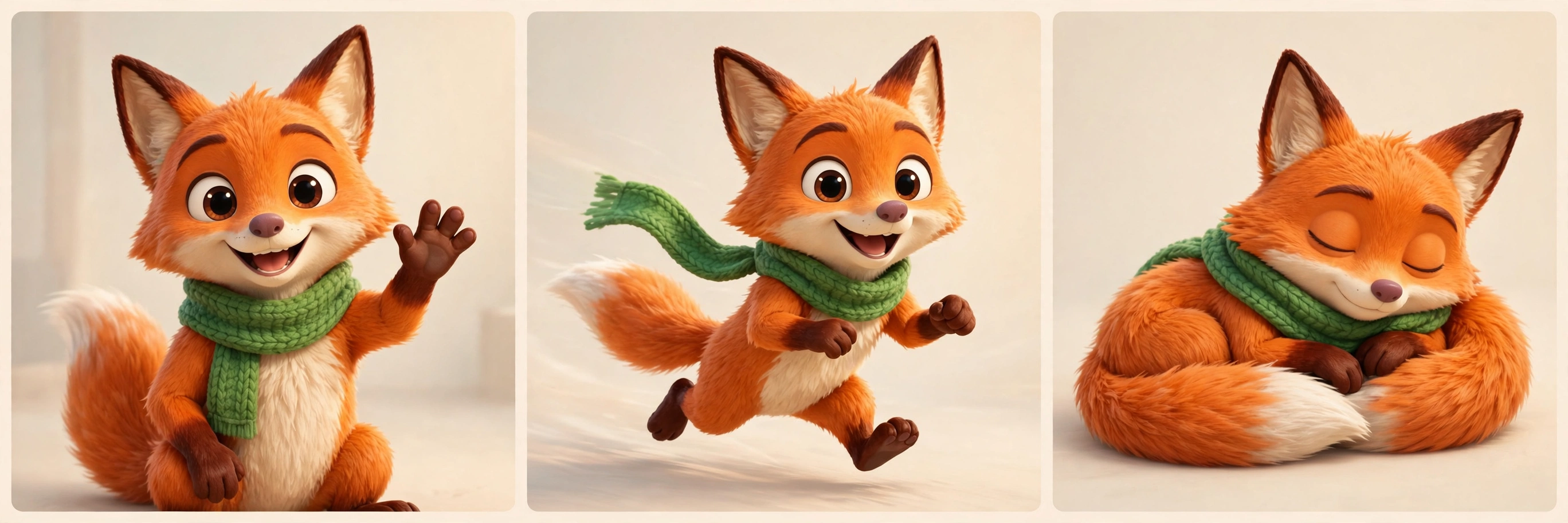
Example: the same fox character, identical in three scenes — locked by the Character ID Block.
Why this prompt works
Character drift is the silent killer of AI video series. You generate a perfect frog in scene one, and by scene four it has different eyes, a new hat and a suspicious extra leg — because each generation starts from scratch and your wording drifted. This prompt attacks the root cause instead of the symptoms. Rather than asking the AI to "remember" your character (it cannot, across separate generations), it produces a single dense, locked description engineered for verbatim reuse — specific enough that the model converges on the same face every time. The fixed ordering (species → colors → face → clothing → signature feature) matters: models weight early tokens more, so the most identity-critical traits come first. The negative consistency list acts as guardrails for the traits models love to "creatively" reinterpret, and the scene adapter template gives you a repeatable ritual: same block, new scene, every time. Series creators use exactly this pattern to produce 10-scene shorts where viewers never notice the character was generated in ten separate renders — which is the whole trick.
How to use it
- Copy the prompt and paste it into your AI chat tool of choice.
- Fill in CHARACTER CONCEPT with your character idea and ART STYLE with your look.
- Save the CHARACTER ID BLOCK it returns — this is now your character's permanent passport.
- For every new scene, use the SCENE ADAPTER TEMPLATE: paste the ID block verbatim, then describe only the new action, camera and lighting.
- Never paraphrase the ID block. Copy-paste it character for character, every time.
- If a generation still drifts, add one item to the negative list describing what changed, and regenerate.
Example use cases
A creator locks a frog-and-duckling duo once, then generates 10 scenes across 3 episodes with zero redesign.
A shop owner keeps their mascot identical across weekly promo clips by reusing one ID block.
An artist pastes the same ID block under each keyframe image prompt so the animated versions match the stills.